
Akool Face Swap, reviewed against its own credit math
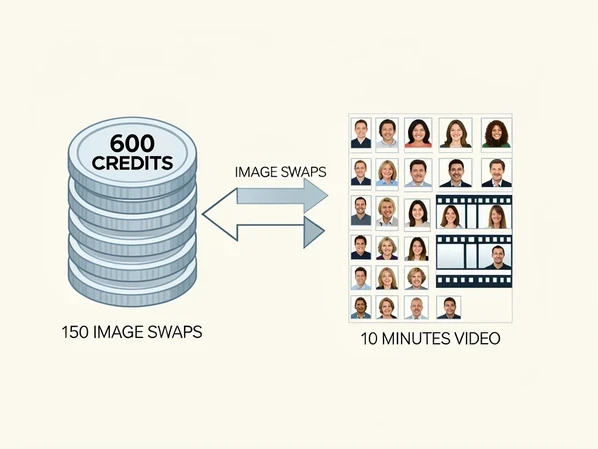
Akool Face Swap is worth paying for if you run high-volume, API-driven video and can absorb a $30 floor. For everyone else the credits hide the real price. An image swap burns 4 credits, a video burns 10 credits per 10 seconds. On the $30 Pro plan that pool of 600 credits equals roughly 150 finished image swaps or ten minutes of clips. The features are strong. The billing reputation is not, and that gap decides the verdict.
Akool Face Swap at a glance: what it is and who makes it
This is not a one-trick face swap toy. Akool positions itself as an enterprise generative AI video suite, with face swap sitting alongside avatars, multilingual translation, and image generation. Over 10,000 companies use it, according to Akool's own face swap page.
You reach it three ways. There is the web dashboard, an open API for building swaps into your own pipeline, and Live Camera, which runs inside Zoom, Teams, and livestreams. That last option is the giveaway: this product is built for production teams, not casual selfie edits.
Who is behind it matters for a trust check. Akool was founded by Jiajun (Jeff) Lu, a former Google and Apple lead who holds a Stanford PhD, and the company is headquartered in Palo Alto. That pedigree is part of why the billing complaints later in this review feel so jarring.
The credit system decoded: what a face swap really costs
Here is the number Akool never puts on its pricing page. Per postunreel.com, an image swap costs 4 credits and a video swap costs 10 credits for every 10 seconds, with a minimum of 10 credits per video. Hold those two figures and the plans stop being a mystery.
The plans themselves come from beart.ai. Pro is $30 a month for 600 credits. Pro Max jumps to $119 for 2,400 credits, adding 4K output and faster processing. Studio sits at $500 for 12,000 credits with 8K. Each drops about 30% if you commit to a year, so Pro effectively becomes $21 a month.
| Plan | Monthly price | Credits | Image swaps | Video at 10s each |
|---|---|---|---|---|
| Pro | $30 | 600 | 150 | 60 clips (10 min) |
| Pro Max | $119 | 2,400 | 600 | 240 clips (40 min) |
| Studio | $500 | 12,000 | 3,000 | 1,200 clips (200 min) |
Work the Pro tier and the picture sharpens. Spend all 600 credits on stills and you get 150 image swaps, about 20 cents each. Spend them on video and 600 credits cover 600 seconds, ten minutes of finished footage, at roughly 5 cents per second. Mix the two and the pool drains faster than most buyers expect, because a single 30-second clip already eats 30 credits.
That 5-cents-per-second figure is the hinge of the whole pricing question. WaveSpeedAI offers the same Akool video face swap on a usage basis at $0.05 per video second, with a 10-second minimum charge. The math lands in the same place, but the billing model is the opposite: you pay for seconds rendered instead of pre-buying a monthly pool you may never finish.
The free plan reality check
The free Basic tier exists to let you test, not to ship. Beart.ai pins the ceiling at 25 images or 1.5 minutes of video, total, before you are stopped.
- Output is capped at 720P and stamped with a watermark, which rules out client deliverables.
- Each upload is limited to 150MB and 30 seconds, so a longer clip has to be cut first.
- You get 3 custom avatars, 60+ public avatars, and 3 member seats.
Picture a real clip running into those walls. A 45-second product teaser shot on a phone already breaks the 30-second file rule and likely the 150MB ceiling, so you split it. Then the 720P cap softens it on a 4K timeline, and the watermark sits across the frame. The free plan answers one question only: does Akool swap your face cleanly? It cannot answer whether the output is usable.
Features that matter for face swap
From the dashboard you pick a gallery image or a template, upload a face, and generate. Three swap modes share that flow: image, video, and group face swap, the last one mapping a single reference face onto several people in one shot. Vidmage.ai confirms all three live in the same place.
Live Camera is the headline. Launched in May 2025 per geniusfirms.com, it does real-time face swap, re-aging, and live translation during Zoom, Teams, or livestreams. Few rivals offer a live swap that holds up on a call, and this is where Akool's enterprise framing earns its keep.
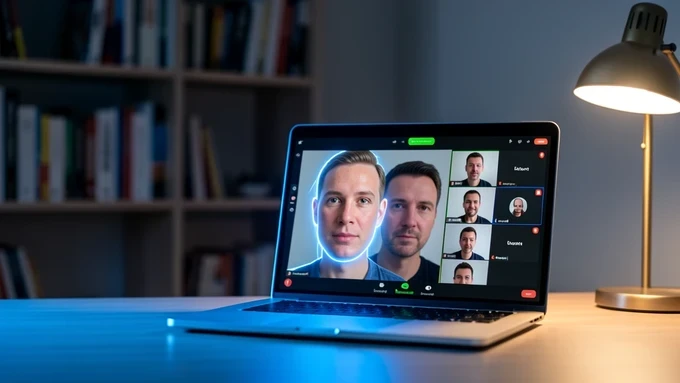
Two refinements push results past the uncanny zone. An age slider and facial enhancement, documented by beart.ai, let you nudge the swapped face younger or older and smooth the blend for a more natural look. Teams that need a repeatable likeness can go further and train custom AI models on their own datasets.
Now the honest part. Reviewers cited by vidmage.ai note that video swaps can run slow and occasionally alter colors and speed. So a clip comes back with the subject's skin slightly off, or the motion subtly faster than the source. When lighting is good the output holds; when it is not, the seams show. Budget a second pass.
Is Akool legit and safe? Billing and trust concerns
Akool is a real, funded company, not a scam storefront. But the trust signals split hard, and a buyer deserves both halves before entering a card.
Start with Trustpilot, because the absence is the story. The public rating is currently unavailable after Trustpilot flagged a guidelines breach and removed fake reviews. A vendor caught inflating its own score is a yellow flag, and it colors how you read every other testimonial.
The recurring complaint is money. One Trustpilot user reported being charged extra that simply disappeared from their account. That theme, surprise and recurring charges, is the single loudest criticism, and it pairs with the credit model: if auto-recharge is on, an empty pool quietly tops itself up. Before you subscribe, find the auto-recharge toggle and turn it off, then set a calendar reminder a few days before renewal.
Speed is the other steady gripe. Renders run roughly 1 to 5 minutes per video according to zeely.ai, which breaks creative momentum when you are iterating on a clip.
Counterweight worth stating plainly: Akool reports $40M in invoiced ARR, ranked #1 on the Inc. 5000 list of fastest-growing private companies in 2025, and counts Qatar Airways and Coca-Cola among its users. Real businesses run real production on it.
So is it legit? Yes, as a product and a company. Is it safe for your wallet? Only if you manage the billing actively rather than trusting it to behave.
Ethics and consent for commercial face swap
Face swap technology should always be used with explicit consent and inside legal limits. Never put someone's likeness into content without their permission, as WaveSpeedAI's own guidance stresses. This is not boilerplate when the output can pass for real footage.
For anything public-facing, treat Akool's watermarking and approval tools as part of the workflow, not an afterthought. Per zeely.ai, reviewing those controls before publishing protects you when likeness and consent are on the line. Keep a signed release for every face you use commercially.
Verdict: who should pay, and who should skip
Akool is a capable, expensive suite whose value flips entirely on how you buy and how much you produce.
Pay for it if you are a marketing team or enterprise that needs high-volume, API-driven, multilingual production. At that scale the per-swap math works, Live Camera and custom models pull their weight, and 4K or 8K output justifies Pro Max or Studio. The credits stop feeling opaque once your volume is steady.
Skip it if you are a budget solo creator. The $30 starting price is triple VidMage's $9.99 entry per vidmage.ai, the credit system is genuinely hard to budget, and the billing complaints hit small accounts hardest. If your usage is light or spiky, a pay-per-second route like WaveSpeedAI at $0.05 a second spares you a monthly pool you will not finish, and a cheaper starting tier serves casual swaps better than Akool's floor.