
Higgsfield Face Swap, judged on its own: identity, credits, and the fine print
Verdict up front: is Higgsfield Face Swap worth it?
Yes for short-form work, no for anything identity-critical. Higgsfield Face Swap is a genuinely useful one-click tool for quick personalization, ads, and UGC, and its cinematic camera control gives those clips a polish most swap apps can't touch. It is not a substitute for professional VFX or long-form work where a face has to stay locked frame after frame. Social creators, marketers, and indie filmmakers cutting short clips get the most out of it.
Skip it if you need rock-solid identity across long or fast-motion video, or if you just want a clean single-photo swap without buying into a credit-metered studio. The rest of this review isolates the swap tool from Higgsfield's headline platform and tests it on three things that decide the call: how well it holds an identity, what a swap actually drains from your credit balance, and how honest the free tier really is.
What Higgsfield Face Swap actually is
Face Swap is a one-click tool that drops a target identity onto a source image or clip using generative identity embedding, not a flat 2D overlay pasted over the original face. According to Higgsfield's own guide, it matches lighting and shadow to the scene and aligns facial geometry, so no prompt or manual masking is needed. That generative approach is why a good swap sits inside the lighting of the shot instead of floating on top of it.
The swap toolset lives inside a much larger product, and conflating the two is where most reviews go wrong. Higgsfield is an all-in-one studio that aggregates third-party models, Sora 2, Kling, Veo 3.1, and Nano Banana among more than fifty, behind a single workspace. Its loudest selling point is Cinema Studio camera control, not face swapping. You are paying for a video platform that happens to swap faces well, which matters when you read the pricing.
Two neighbouring features do the heavy lifting for video. Recast Studio, also called Character Swap, replaces a character inside an existing clip without regenerating the whole thing, per Segmind's feature breakdown. Soul ID is the consistency layer: a saved character profile that locks a facial identity across generations, so the same person looks like the same person across multiple shots. If you swap faces on video at all, Soul ID is the part you will lean on most.
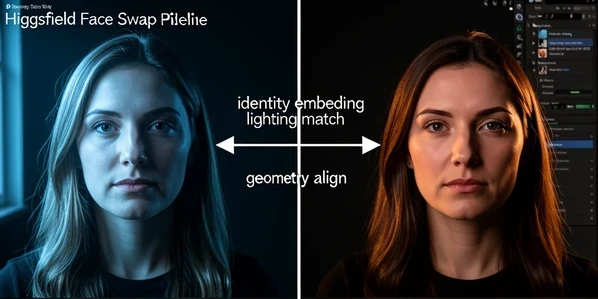
Identity fidelity: stills vs short clips vs long clips
Identity holds best on stills and short clips, and starts to slip the longer and faster a shot runs. That single behaviour decides whether the tool fits your work. On a still or a tight few-second clip, the swap reads clean. Push into longer or fast-motion footage and identity drift becomes the most cited weakness across user reports, with occasional rendering artifacts noted by reviewers at Lovart.
Where does it break? Two places. Edges around hair and the seam between the swapped face and the background tend to give a swap away, and identity drifts further when you feed it many reference sources at once. Even reviewers who praise the camera work, Filmora among them, flag that character consistency still needs work. One benchmark from Deeper Insights scored motion quality around 3.6 out of 10, which lines up with the wobble people see on movement-heavy shots.
Soul ID is the intended fix. By locking a saved identity, it pulls multi-shot work back toward consistency instead of letting each generation reinterpret the face. It helps. It does not fully erase drift on fast motion, so treat it as mitigation, not a guarantee.
A practical read on the three tiers of fidelity:
- Stills: cleanest results, lighting and shadow matching does its best work here.
- Short clips of a few seconds hold identity well enough for social and ad cuts, with minor edge cleanup.
- Clips in the 15 to 30 second range, or anything with quick head motion, are where drift, hair seams, and the plastic-face look surface, and where you should plan re-rolls into your credit budget.
What a face swap really costs: credits and tiers
Everything runs on credits, and the credits drain faster than the plan names suggest. Higgsfield uses a tiered model that Segmind documents as running from a $0 Free plan up through Creator, with the full ladder reaching roughly $249 a month at the top. A swap is cheap on a basic model and expensive on a premium one, so your effective cost depends less on the plan price than on which model you route the job through.
The Free plan gives 150 credits a month, 2 concurrent image jobs, 2 concurrent video jobs, 1 active character job, and selected models only, per Segmind. Pro is the most popular tier at about $17.40 a month with roughly 600 credits and up to 3 videos, 4 images, and 2 characters running at once, according to Deeper Insights. Ultimate runs $24.5 to $29.40 a month with around 1,200 credits, per a hands-on review at Experiment.com. Need more without upgrading? Credit packs sell at $5 for 80 credits and $80 for 1,700.
| Plan | Price (billed annually) | Credits / month | Concurrent jobs |
|---|---|---|---|
| Free | $0 | 150 | 2 image / 2 video / 1 character |
| Basic | $9 | 150 | 2 image / 2 video / 1 character |
| Pro (most popular) | $17.40 | ~600 | 4 image / 3 video / 2 character |
| Ultimate | $24.5 to $29.40 | ~1,200 | 8 image / 4 video / 3 character |
| Creator | $49.8 to $119 | ~6,000 | 8 image / 8 video / 6 character |
Here is the part the price tags hide. Premium models and 4K output sit behind the higher plans, and those are exactly the models that burn credits fastest. A worked example: 150 free credits will cover a handful of image swaps but only a couple of short premium video jobs before the balance is gone. Pro's ~600 credits stretch much further on image work than on video, where a single premium clip can swallow a noticeable slice. Budget for re-rolls, because the drift fixes above cost credits too.
In-platform credits vs Segmind pay-per-generation
If you swap occasionally, a subscription with expiring credits is the wrong shape, and there is a cleaner path. Segmind offers pay-per-generation access to Higgsfield models, so you pay only for the jobs you run with no monthly balance to spend down or lose. Costs there run from roughly $0.12 for images to $0.86 and up for premium video, per Experiment.com.
Concrete numbers help. Through Segmind, Image-to-Video lands between $0.160 and $0.700 per generation, and Text-to-Image Soul between $0.120 and $0.230, per Segmind's own pricing. Run the same swap two ways and the math is simple: a light month of a dozen image swaps costs a couple of dollars on Segmind, while the equivalent Pro subscription bills you whether or not you generate anything. Heavy, daily users still come out ahead on a Higgsfield plan. Light or bursty users almost never do.
The free-tier reality: giveaways and the 90-day expiry trap
The free tier is not a normal open trial, and assuming it is leads straight to disappointment. Free credits are handed out through time-limited social media giveaways with claim windows of roughly nine hours, per Segmind, not a sign-up-and-go allowance you can grab whenever. Miss the window and you wait for the next drop. That alone reframes the $0 plan from a generous trial into a marketing funnel.
Then there is expiry, in two flavours that catch people out. Your monthly subscription credits do not roll over: whatever you don't spend disappears at the end of the billing cycle, per Experiment.com. Separately purchased credit packs and extra credits live longer but still expire after 90 days even if untouched, per Segmind. So a pack you bought for a project that slipped can evaporate before you return to it.
Timeline to watch: claim free credits inside a ~9-hour giveaway window, spend monthly credits before the billing cycle resets or lose them, and use any purchased pack within 90 days. Three different clocks, three different ways credits vanish.
Is Higgsfield legit and safe? Billing and reliability
It is a real, funded company, and the safety question is more about your wallet than the product being a scam. Higgsfield came out of Snapchat's AI orbit: founder Alex Mashrabov was Director of Generative AI at Snap Inc., and the company raised $8M in seed funding, per Pollo. That pedigree is real, and the tools work as advertised.
User sentiment splits hard, though. Praise clusters around the tools and the experience, while the complaints cluster around billing, refunds, and reliability, per Segmind and Pollo. The most upvoted positive read is an Ultimate subscriber calling the whole experience seamless and worth it. Against that sit recurring gripes about charges and refund friction. Adding to the noise, pop-ups and upsell prompts interrupt the workflow, which wears thin fast when you are mid-edit. Read the billing terms before you commit a card.
Consent, biometrics, and swapping real faces
An uploaded face is biometric data, and Higgsfield's policy on it is the gap nobody fills. Reviews skip it; we won't. The standing ethical guidance, echoed by Lovart, is plain: get consent from the person whose face you use, and apply watermarks where appropriate, because careless swaps carry real privacy and ethical risk.
The harder problem is what the platform itself promises about your data. Across the sources, there is no clearly published biometric-consent policy and no stated face-deletion process. Treat that as an open question to verify against the current terms before uploading anyone's face but your own. And the legal exposure is yours, not the tool's: swapping a celebrity or any third party without permission can land you in liability for likeness and defamation claims, regardless of what the software allows.
Before you swap a real third party, run this check:
- Written consent from the person whose face you are using, kept on file.
- A visible watermark or disclosure when the output could be mistaken for real footage.
- No public figures or copyrighted characters unless you hold a licence or clear fair-use grounds.
- Confirm the platform's current data-retention and deletion terms yourself, since they are not spelled out in third-party reviews.
Who should use it, and the alternatives
Strong fit: creators making short UGC, ads, and social clips where the cinematic camera flair earns its keep and a few seconds of footage keeps identity inside its comfort zone. That is the sweet spot, and within it Higgsfield is hard to beat on look. Weak fit: identity-critical long-form video, fast-motion sequences, and anyone who only needs a one-and-done single-photo swap without renting a whole studio.
On where it ranks, Pollo's read is fair: Higgsfield is good for camera effects but not better than Kling and Runway on raw output. So if motion and reliability outrank camera presets for you, Kling handles raw video and motion quality better, and Runway gives a more dependable professional pipeline. Swapping only now and then? Segmind's pay-per-generation route skips the subscription and the expiring credits entirely. Match the tool to the shot, not to the marketing.