
FaceApp Pro tested: is the subscription worth paying for?
FaceApp is one of the better one-tap portrait editors on mobile, but the honest answer to 'should you pay for Pro?' is this: only if you edit faces often. The free version hands you a thin slice of filters wrapped in ads and watermarks. Pro costs $10 a month, or $5 a month if you commit to a full year, and a one-week trial lets you test before the first charge. Your photos go to the cloud, sit cached for up to 48 hours, then get deleted. And the features many people remember, Face Swap, Morph, video editing, the lifetime license, are gone.
What is FaceApp? Quick overview
FaceApp is an AI portrait editor that launched in 2017 and has since crossed 500 million downloads on Google Play. On the US App Store it holds a 4.7-star average across roughly 1.7 million ratings, which tells you the output quality is real, not marketing noise.
It runs on iPhone, iPad, Android, and Chromebook, and you can grab it from FaceApp directly or either app store. The pitch is simple. Load a selfie, tap a filter, get a polished result in seconds. No layers, no manual masking.
One thing to set straight before you download. FaceApp is not a face swap app anymore. Face Swap, Morph, and video editing have all been pulled from the product. If that is what brought you here, jump to the alternatives at the end.
FaceApp features: what it can actually do
The core of FaceApp is a library of more than 60 photorealistic Impression Filters, each applied with a single tap. Around that sit the tools people open the app for.
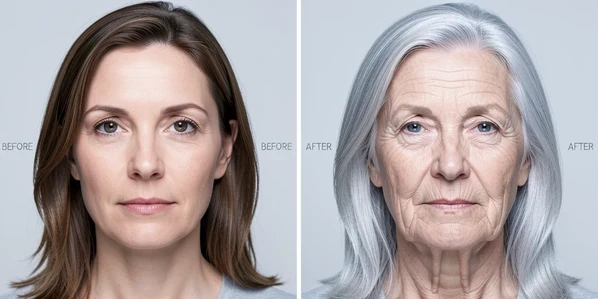
The headline tool is Age Transformation, which carries eight age prompts running from young and teen up to old. Results on a clean, front-facing photo are genuinely convincing, and this is the filter most people install FaceApp to try.
Gender Swap reshapes facial features to simulate a different gender. The AI guesses your gender automatically, and when it guesses wrong you can correct it by hand under Settings > General. That toggle is buried, so plenty of users never find it.
- Hair Color and Hairstyle changer for trying a shade or a cut before you book the salon
- Makeup Filters, contour included, applied as full looks instead of single products
- Skin Retouch clears blemishes and smooths wrinkles while keeping natural texture intact
- Facial Feature Adjustment gives slider control over cheekbones, jawline, nose, and face slimming
- Color and tone controls plus lighting adjustments for fixing shadows and highlights
- Background Effects and Weight Filters round out the kit
Every edit sits behind a Before & After Compare Tool you can hold at any step, which makes it easy to judge whether the filter helped or overcooked the photo. One catch runs through all of it: your source has to be front-facing and close-up, or face recognition simply will not lock on.
Free vs Pro: exactly which features are locked
Here is the part that decides everything. The free tier gives you a limited filter selection, shows ads, stamps watermarks on saved images, and caps how often you can apply filters. The filters people actually want, aging, gender swap, advanced makeup, all sit behind the Pro paywall, which is why the free version feels close to unusable for serious edits.
| Plan | Price | What you get |
|---|---|---|
| Free | $0 | Limited filters, frequent ads, watermarks on saves, frequency caps |
| Pro Monthly | $10/month | Unlimited filters, no ads, high-res watermark-free saves, exclusive and new filters |
| Pro Annual | $5/month (billed annually, about $60/year) | Same as Pro Monthly at half the monthly rate |
A one-week free trial lets you sample Pro before paying, as CNET documented in its hands-on test. Worth knowing before you decide: the lifetime license that once cost $50 is gone, and the developer has confirmed it is not coming back. Recurring billing is the only way in now.

Features FaceApp has permanently removed
If you used FaceApp a few years ago, the app you remember no longer exists. Several marquee features have been cut, and in most cases the developer has said outright that they are not returning. The Face Swap removal got the bluntest reply:
The Face Swap feature was removed because it no longer aligns with our development concept. We are sorry, but it has been removed permanently and won't be back.
Morph is gone too. Video editing is being phased out gradually and pushed into a separate application, per the developer's own statement that FaceApp 'will remain a photo editing app as it was in the beginning.' The lifetime Pro license was pulled, in the developer's words, 'for internal reasons,' with no plan to revive it.
The bigger problem is how it happened. People who subscribed specifically for video editing or Face Swap got no adequate notice before those tools vanished. There is precedent for abrupt changes: back in 2017 FaceApp killed a 'Hot' filter, also called 'Spark,' after users showed it lightened dark skin and reshaped features to look more European.
Privacy and data handling: what actually happens to your photos
Your photos do not stay on your phone. FaceApp uploads them to Google Cloud and Amazon Web Services for processing, holds them in the cloud for 48 hours at most, then deletes them. Each file is encrypted with a key stored locally on your own device, so the cache is not plaintext sitting on a server.
The developer states photos are never used for anything beyond letting you edit them, and that data is not sold or rented to third parties. That is the reassuring half of the story.
The other half is messier. Common Sense Media found that data is collected by third-party advertising and tracking services and used to target ads on other sites and apps, and that it is unclear whether data is shared for outside marketing. So 'we don't sell your data' and 'trackers harvest it to serve ads elsewhere' both appear to be true at the same time.
The two stores paint different pictures. Apple's privacy label says the data FaceApp collects, including purchase history, identifiers, usage data, and diagnostics, is not linked to your identity. Google Play states the app may share Location, Financial info, and other data types with third parties, while noting data is encrypted in transit and you can request deletion.
FaceApp carries a privacy warning rating from Common Sense Media, and the developer, FaceApp Technology Limited, is registered in Cyprus at 8 Mykinon, Nicosia 1065. The fair conclusion, and the one privacy experts reach, is that FaceApp's risks are not meaningfully worse than comparable photo apps. Cloud processing is the trade, and most rivals ask for the same one.
Known limitations and frustrations
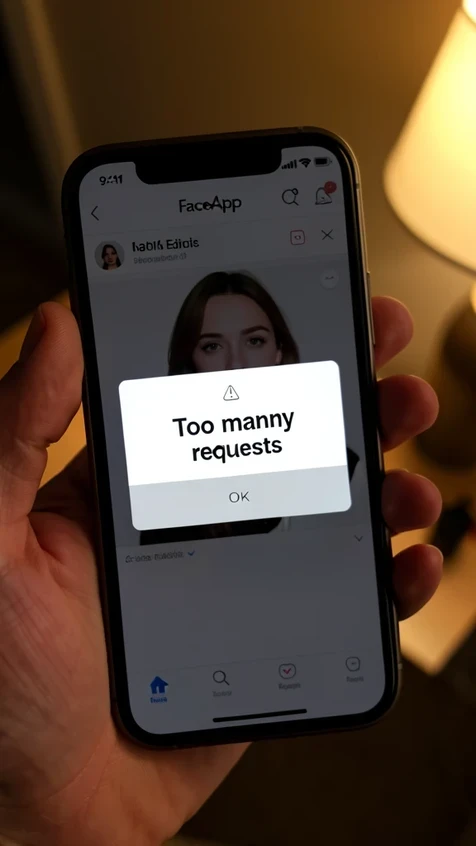
Pay for Pro and you can still hit a wall: 'Too many requests.' One subscriber reported the rate limit kicking in after editing only 8 photos. FaceApp's reply was that limits reflect the service's technical capabilities and exist to prevent abuse, with the detail spelled out in the Terms of Use. That is cold comfort when you are mid-session.
- The app strips EXIF metadata, so edited photos lose their original capture date, time, and location
- AI gender recognition can tag you wrong, and the manual fix under Settings > General is easy to miss
- Group shots and candid angles often fail outright, since recognition needs a close-up, front-facing face
- The download weighs 151 MB
Then there is the rating split. On Trustpilot, FaceApp scores a brutal 1.7 out of 5 from 31 reviews. Set that against 4.7 stars from 1.7 million App Store ratings and 4.5 stars from 5.34 million Google Play reviews. The tiny, furious Trustpilot sample mostly captures billing disputes, while the app-store millions reflect the editing itself.
How to cancel FaceApp Pro and avoid auto-renewal charges
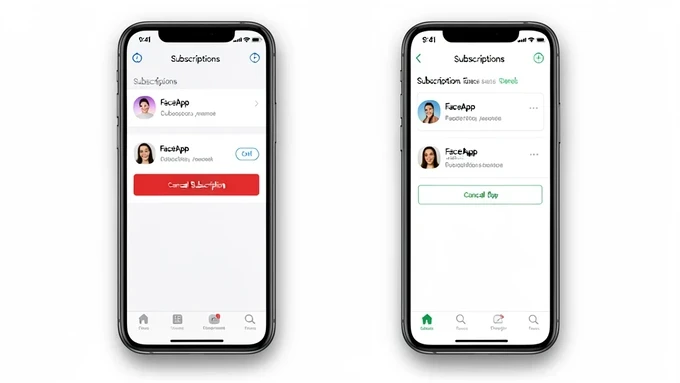
Cancel through your app store, not inside FaceApp. The subscription is billed by Apple or Google, so that is where you switch it off.
- On iOS, open Settings and tap your Apple ID name at the top
- Go to Subscriptions
- Select FaceApp, then tap Cancel
- On Android, open the Google Play app and tap your profile icon
- Go to Payments & subscriptions, then Subscriptions
- Pick FaceApp and tap to cancel the subscription
Timing matters more than the taps. Cancel before the one-week trial ends or you will be charged, and once charged, refunds are hard to win. Billing complaints are a recurring theme in the reviews, and one subscriber even reported the price jumping from $5 to $8 a month with no warning.
Last thing to understand. Canceling stops future charges, it does not refund the period you already paid for. You keep Pro until the current cycle runs out, then it lapses to free.
Is FaceApp Pro worth it? Verdict by use case
No single answer fits everyone, so here it is by who you are.
- Casual selfie editors: the free tier covers basic filters, and Pro only earns its keep if you want the advanced transformations
- Social creators who need watermark-free, high-res output: the annual plan at $5 a month is fair value
- Anyone who wanted video editing or Face Swap should look at the alternatives below, because this is no longer the right tool
- Privacy-first users: cloud processing is mandatory here, so if you need on-device editing, FaceApp fails the test
- Budget-minded users: the annual plan runs $60 a year against $120 for monthly, making annual the only rational choice if you commit
- Former lifetime license holders: that door is shut for good, and a recurring subscription is the only way back in
The overall read: FaceApp is a strong portrait editor inside its narrowed niche. But the paywall is steep, the removed features are a real loss, and the free tier is too thin to lean on. Frequent face editors get their money's worth on the annual plan. Everyone else can wait or look elsewhere.
FaceApp alternatives: when to use something else
If FaceApp does not fit, a few tools cover the gaps it left behind.
- Reface, DeepSwap, or Remaker AI for swapping faces between two people, the feature FaceApp dropped
- Magic Hour or DeepSwap when you need video face swap
- Facetune for granular manual retouching, or Adobe Lightroom Mobile for color grading and batch work
- Snapseed if you just want free portrait editing without subscription pressure
Each of these has a dedicated review of its own, so treat this as a pointer rather than a head-to-head comparison.
$10 a month for filters is wild to me. the output is good sure but thats subscription money for something i'd touch maybe twice a year