
BeArt AI Face Swap reviewed: where the free promise quietly ends
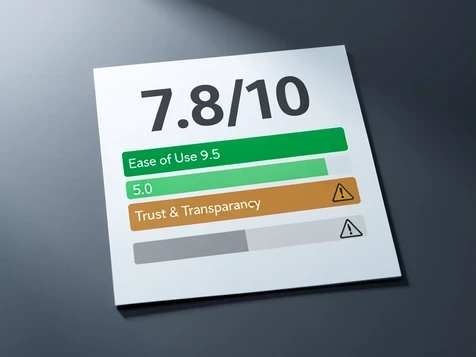
Short answer: BeArt is genuinely free for photo and GIF face swaps, with no watermark and no account, and it runs in a browser on desktop, tablet, or phone. The headline holds up until you move to video or lip-sync, where a credit meter switches on. Trust is the catch. Smartpostly rates BeArt 7.8/10 overall but flags Trust & Transparency at 5.0/10, and there is no disclosed company or on-record privacy policy. For stills you lose nothing. For commercial work or long clips, read on before you upload.
This is a review aimed at one reader: the budget creator who wants fast watermark-free swaps without a subscription. So the whole piece tests a single question, where the free model stops paying for itself.
BeArt in one minute: what it is and the verdict up front
BeArt AI Face Swap is a browser tool. No install, no download, nothing to set up on desktop, tablet, or mobile, per the listing on aitools. You upload a source face and a target, and it returns a swapped result. For static images and animated GIFs that result arrives clean: no watermark stamped across it, and no login wall before you can preview or save.
That is the part of the promise that survives scrutiny. The verdict hinges on the next part. Photos and GIFs cost nothing. Video and AI lip-sync are metered in credits, and BeArt never publishes a hard free quota. So the tool is two products wearing one label, a free still-image swapper and a pay-per-second video engine.
Is it actually free? Mapping where the credit meter starts
Free means free for a defined set of actions. Photo swap, GIF swap, no watermark, no signup. None of those touch a credit balance. The moment you feed BeArt a video, the meter starts ticking, and the rate climbs with frame rate and complexity.
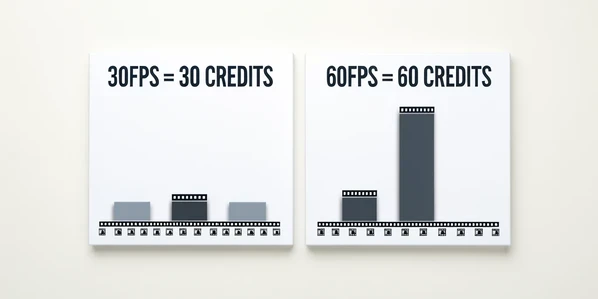
Smartpostly documents the ladder. Standard 30fps video runs about 1 credit per second. Push to 60fps and that doubles to roughly 2 credits per second. AI lip-sync sits in its own band entirely, 4 to 10 credits per second, the single most expensive thing the tool does.
Put numbers on it. A 30-second clip at 30fps costs around 30 credits. The same clip at 60fps costs roughly 60. Add lip-sync to those 30 seconds and you are looking at 120 to 300 credits for half a minute of audio-matched footage. That is the gap between the headline and the invoice.
The real problem is what BeArt does not tell you. There is no published free-tier quota, no weekly credit allotment in hard numbers. You learn the cost by spending, which is exactly the trap budget creators want to avoid.
Features that work and where quality holds up
Photo swap is the strongest piece. Smartpostly cites a claimed 98% accuracy, with the model matching lighting, skin tone, and expression rather than pasting a flat face onto a head. On clean, well-lit, front-facing input it shows. Output looks like it belongs in the frame.
Video swap relies on frame-by-frame tracking and handles clips up to 100MB. Multi-face support is the standout: up to five faces swapped at once, which turns a group photo into a single job instead of five. Streamers in community threads call out the consistency on high-volume runs, and BeArt's free Sora watermark removal earns its own small fan club.
Beyond the core swap, BeArt bundles extra tools: Unblur Images, Sora watermark removal, AI Lip Sync, Video Upscaler, and an AI Portrait Generator. Useful as a toolbox. None of them rescue a bad input, though.
- Lighting decides realism, so flat or mixed light produces a swap that reads as fake.
- Pose matters: side profiles and steep angles confuse the tracker.
- Low resolution in equals soft, smeared output, no matter the model's accuracy claim.
Take a swap that fails on a side-profile, low-res selfie. The eyes drift, the jawline ghosts. Re-shoot the same face front-on under a window's soft daylight at a higher resolution, and the same engine lands it. The fix is almost always upstream of the tool.
The limits nobody spells out: file size, faces, and frame rate
Two ceilings are documented. Video uploads cap at 100MB, and you can swap up to five faces simultaneously. Both are generous for short-form work and restrictive for anything longer.
What BeArt leaves blank is louder than what it states. Maximum video length? Not published. Output resolution? Not stated. So you cannot plan a project around guaranteed specs, you discover them when an upload bounces.
And frame rate is where the economics bite. Because 60fps doubles the credit burn, a long high-fps clip gets expensive fast while also straining the 100MB ceiling. A two-minute 60fps export at decent bitrate can blow past 100MB before you even reach the credit cost. Short and smooth, BeArt handles. Long and high-fps is the wrong job for it.
Trust and transparency: the 5.0/10 problem
Here is the part competitor reviews skip. BeArt scores 5.0/10 on Trust & Transparency in Smartpostly's breakdown, dragging down an otherwise strong 7.8/10 (Ease of Use lands at 9.5/10). The low mark is not arbitrary.
No company or legal entity is disclosed behind BeArt. There is no verbatim, on-record privacy policy. Commercial-use and ownership terms stay vague. For a tool that asks you to upload someone's face, those are not footnotes, they are the decision.
On data, the signals are mixed but worth knowing. Tenereteam reports that BeArt claims it does not collect user data and deletes generated content shortly after use. The retention window is short. That cuts both ways: less of your content sits on a server, but you have to download promptly or lose the result.
Consent is not optional. Using a real or celebrity face without permission to make misleading, defamatory, or sexual content is illegal in most countries, and platforms remove it on sight. The tool's silence on licensing does not transfer that risk away from you.
BeArt vs the paid crowd: where free wins and where it loses
Set BeArt next to a subscription rival and the trade becomes obvious. DeepSwap charges $9.99 a month for 20 credits, or $49.99 a year for 240, with the annual price renewing to $99.99 after year one, per fritz.ai. What that money buys is ceilings and paperwork BeArt lacks.
| Factor | BeArt | DeepSwap |
|---|---|---|
| Entry cost | Free for photos and GIFs | $9.99/mo or $49.99/yr (renews to $99.99) |
| Signup | None required | Account required |
| Video ceiling | 100MB, length not stated | 1GB / 30 minutes |
| Faces per job | Up to 5 | Up to 6, batch of 5 files |
| Retention | Short, undocumented | 30-day uploads, 7-day output, Irish servers |
DeepSwap processed a 15-second clip in under a minute and handles batch uploads of five files, which matters when you are grinding through volume. Its retention and server location are written down. BeArt's are not.
So the line is clean. BeArt wins on free stills and zero friction. The paid crowd wins on long-video ceilings, batch throughput, and documented policies you can actually point to. Other names like FaceFusion (claimed higher fidelity and 4K) or Reface (polished mobile app) fit different needs, but the head-to-head that defines BeArt is free-no-signup versus paid-with-paperwork.
Who should use BeArt, and who should skip it
If you make memes, GIFs, and quick social stills, BeArt is close to ideal. Free, watermark-free, no account, instant in a browser. For that reader the trust gaps barely register because nothing sensitive is changing hands and nothing is going to a paying client.
Skip it if you run a brand or sell the output. Vague licensing and a missing privacy policy are a real liability when a client or platform asks who owns the result and where the face went. That is a question BeArt currently cannot answer.
- Best for: meme and GIF makers, casual users, streamers wanting fast free watermark-free stills.
- Risky for: brands and commercial users who need clear licensing and a documented privacy policy.
- Wrong tool for: long, high-frame-rate video, where credit costs and the 100MB cap turn against you.
The verdict, then. BeArt earns its free label for photo and GIF work and makes a strong short-form sidekick. The economics flip on long, high-fps video and lip-sync, and the unresolved company, privacy, and licensing gaps keep it off the table for commercial or sensitive use. Use it for what it is free at, and pay elsewhere for the rest.