
Face swap apps for photos, ranked by what you actually need them for
Reface is the strongest all-round pick for casual and social photo swaps, but the right app depends on the job. Want a free browser swap with no account? Pixlr. Need output you can legally sell? Higgsfield AI. Swapping a whole family photo at once? Remaker AI. Worried about where your face data goes? faceswapper.ai keeps no biometric templates. The eight tools below are ranked by use-case fit, not download counts, with verified free-tier limits, watermark policies, and the billing traps real users keep hitting.
How we picked the best face swap apps for photos
Popularity rankings are useless when every list opens with the same five apps. We ranked by use-case fit instead: the specific photo job each tool handles best.
- Output realism, meaning how well a swap matches lighting, skin tone, and expression on a real photo rather than a polished marketing sample
- Free-tier reality: the actual quota you get before a paywall
- Watermark policy on free exports
- Platforms covered, across iOS, Android, web, and desktop
- Whether pricing is transparent or buried behind a trial
- How the app handles your photo data once processing is done
Those criteria came straight from what frustrated users report: watermarks that ruin a free export, charges higher than the advertised price, swaps that got worse after an app update, and processing slow enough to make you give up.
Quick comparison table: best face swap apps for photos at a glance
| App | Best for | Free tier | Watermark on free | Platforms | Starting price |
|---|---|---|---|---|---|
| Reface | Casual and social sharing | Limited exports | Yes | iOS, Android | $3.99/mo |
| FaceApp | Filters, age and gender transforms | One free filter per section | Varies by filter | iOS, Android | ~$8/mo |
| Pixlr AI Face Swap | No-account browser swap | Free online use | Not stated | Web | Free |
| Higgsfield AI | Commercial-use creative swaps | 5 swaps per day | Not stated | Web | Paid Pro for commercial use |
| Remaker AI | Group and batch swaps | Free version | Not stated | Web | Free version |
| PhotoDirector | Professional headshots, desktop | Free version | Not stated | iOS, Android, Windows, Mac | Free version |
| Face Swapper (faceswapper.ai) | Privacy-first swaps | Free version | Not stated | Web | Free version |
| Snapchat | Real-time AR fun | Free | No (AR filter) | iOS, Android | Free |
Best overall: Reface, the most polished photo and video swap for social sharing
Reface is the app most people mean when they say face swap. It uses GAN-based rendering, which is why a swapped face picks up the lighting and skin tone of the target photo instead of sitting on top of it like a sticker. 100M+ downloads back that reputation.
The ratings tell two stories, though. On the iOS App Store, Reface holds 4.8 stars across 490,000 ratings. On Google Play it sits at 2.3 stars from 1.79 million reviews. That gap is not noise. The iOS build is the polished one; Android users report crashes and weaker results at a far higher rate, with billing friction on top. Check your platform before you trust the marketing.
Export a swap on the free tier and a Reface watermark lands on it, with a cap on how many you can make. Tap download, the upgrade prompt appears. The Pro plan runs $3.99 a month for watermark-free HD output and the full content library.
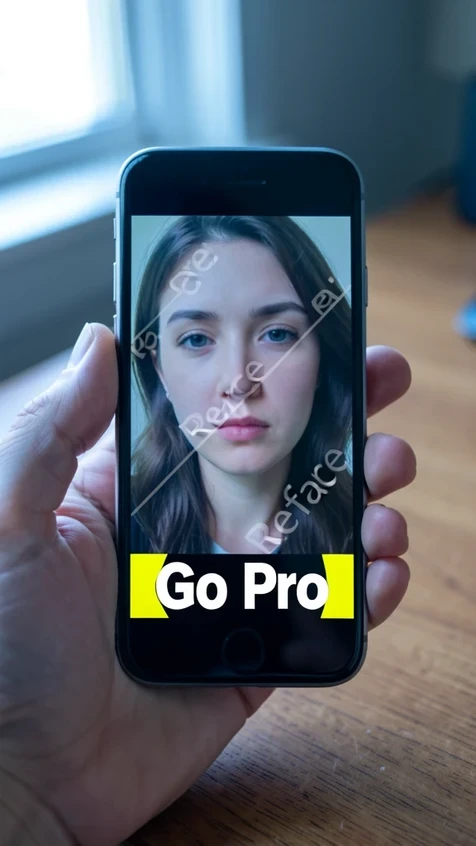
Two cautions. Some long-time users say face feature preservation got weaker after certain updates, so the swap that impressed you last year may look softer now. And subscriptions auto-renew: turn off auto-renew at least 24 hours before the period ends in your Account Settings, or you get billed for another month.
On the App Store, Reface discloses tracking of purchases, user content, identifiers, and usage data, with some of it not linked to your identity.
Best for filters and fun edits: FaceApp, 500M+ downloads and 60+ photorealistic filters
If you want range rather than realism, FaceApp wins on sheer volume of edits. 500M+ downloads, 5.34 million reviews, and a 4.5-star rating on Google Play make it the largest face-editing app here.
Its 60-plus photorealistic filters cover far more than swapping. Age transformation is the headline, with gender swap and hairstyle changes alongside it, each applied in a single tap. Beginners get up to speed fast.
The free tier gives you at least one free filter per section, per the developer's own response to reviewers. Everything else needs a subscription, and that price has climbed. Users now report $8 a month, up from the $5 many signed up for.
Even paying does not guarantee a smooth ride. Subscribers have hit a 'Too many requests' wall during normal use. Worth knowing who you are trusting: FaceApp is run by FACEAPP TECHNOLOGY LIMITED, based in Nicosia, Cyprus.
Its Play Store data-safety section lists location, financial info, and other data types as potentially shared with third parties. Data is encrypted in transit, and you can request deletion.
Best free browser tool (no account needed): Pixlr AI Face Swap
Pixlr is the answer to 'I just want one swap and I am not making an account.' It runs in the browser, free, with no signup for basic use. Pick a themed template, drop your face in, download a PNG. You can open Pixlr's face swap tool and have a result before most apps finish installing.
- Adventure and Fantasy templates for costume-style edits
- A Gym Buff option that drops your face onto a bodybuilder
- Sports, Beach Party, and Super Heroes sets aimed at social posts
The trade-offs are real. Output is PNG only, there is no video swap, and you will not find advanced editing tools. On privacy, Pixlr states plainly that 'your creative output is entirely yours to own, ensuring your content remains private and secure.' Best for casual one-off swaps and meme templates, especially if you refuse to hand over an email.
Best for cross-style swaps (photos to paintings or 3D): Higgsfield AI, 5 free swaps per day
Higgsfield AI is the pick when the output has to earn money. Its paid Pro plans spell out commercial use rights: you get to use generated content 'for marketing, advertising, or any other business-related purpose.' That detail, quoted from Higgsfield's face swap page, is missing from nearly every competitor list.
It also swaps across visual styles, well beyond photo to photo. Move a face onto a painting or a 3D-rendered model and it holds up. The free plan gives exactly 5 generations a day, and the counter resets roughly 24 hours after your first swap, not at midnight. Each render takes 30 seconds to 2 minutes depending on your plan and the queue.
One face at a time, for now. There is no simultaneous multi-face mode yet, so group shots are not its strength. Higgsfield runs industry-standard security, keeps content ownership with you, and enforces a strict policy against non-consensual use. Best for social media creators and marketers who need output they can legally publish.
Best for batch and group photo swaps: Remaker AI
Need every face in a group shot swapped in one pass? Remaker AI is built for that. Where single-face tools make you repeat the process person by person, Remaker handles multiple faces in a group photo simultaneously, and a free version lets you test it. Output is image only, no video. It fits family photos, team headshots, and marketing campaigns that need several faces replaced at once.
Best for professional headshots and cross-platform editing: PhotoDirector
PhotoDirector is the only tool here that runs on iOS, Android, Windows, and Mac, so your edit follows you from phone to desktop. That desktop reach matters when you want a clean, professional result rather than a quick laugh.
Its AI Cut Out tool lets you refine face edges by hand, which is the difference between a believable headshot and an obvious paste job. A free version is available, and output is photo only. Best for professional headshots and LinkedIn photos where desktop-quality output is the point.
Best privacy-first option: Face Swapper (faceswapper.ai)
faceswapper.ai is the choice when your worry is not the result, it is the data. It processes images on the fly: no facial maps, no biometric vector templates kept on a server after your swap is done. For anyone uneasy about handing their face to a cloud model, that is the strongest privacy posture on this list.
It preserves faces up to 1024 px and runs automated AI moderation to flag inappropriate content. The trade-offs: you cannot upload a custom face, and the real-time approach makes swaps slower than upload-based tools. A free version is available.
Best AR-based real-time swap: Snapchat
Snapchat belongs in a different category, and that is the point. Its face swap is an AR lens working in real time, not an AI deep-learning model rebuilding your face from data. With 1 billion downloads and zero learning curve, you point the camera and the swap happens instantly, free.
Just do not expect photorealism. There are no advanced editing tools, and the result looks like an AR filter, because it is one. Best for live camera fun, Stories, and quick social sharing, not for a photo edit you want people to believe.
How to get the best results from any face swap app for photos
The app matters less than the photo you feed it. Every tool here improves with a front-facing, evenly lit shot and degrades on the same difficult inputs.
- Use a front-facing photo with even light; harsh shadows and backlighting confuse the blend
- Skip low-resolution or heavily compressed images, since the swap inherits whatever detail is missing
- Glasses, profile angles, and heavy makeup reduce accuracy across every tool, not just the cheap ones
- In a group photo, make sure no face is partly hidden behind another
- Match the lighting direction between the source face and the target photo so shadows line up
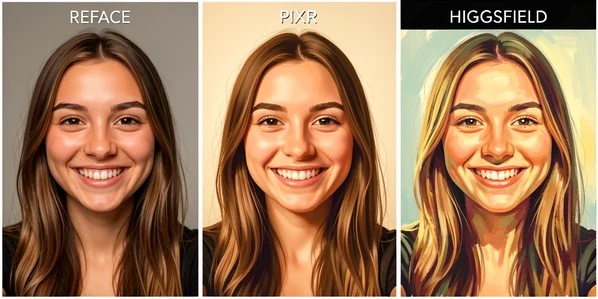
Take one well-lit selfie through three tools and the differences show. Reface blends skin tone and lighting most convincingly. Pixlr is faster and free, but leans template-stylized rather than photoreal. Higgsfield handles the swap cleanly and, unlike the other two, lets you carry it into a painting or 3D style.
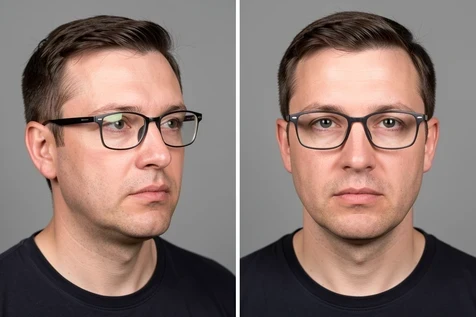
Here is why those rules bite. Shoot a photo where you are wearing glasses at a slight side angle and most tools smear the frames or misalign the eyes, because facial landmark detection loses the points it needs. Straighten the angle, take off the glasses, and the same tool that failed suddenly nails it.
As one tester put it: 'The biggest factor is lighting and expression handling. A lot of tools look fine on a still face, but the moment someone blinks, smiles, or turns their head, the illusion breaks.'
Are face swap apps safe? Privacy and data handling explained
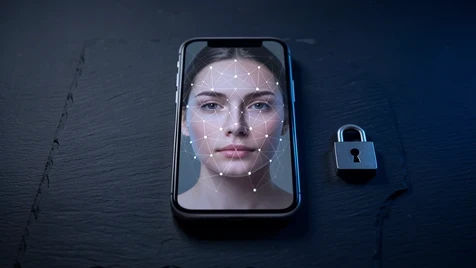
Mostly yes, with caveats that vary sharply by app. Safety comes down to two things: what the app does with your photo, and whether it bills you fairly.
- Reface (Google Play) may share your photos, videos, and app performance data with third parties; it is encrypted in transit, and you can request deletion
- FaceApp may share location and financial information, among other types, with third parties, also encrypted in transit with deletion on request
- faceswapper.ai keeps no biometric templates at all, processing on the fly, the safest position here
- Higgsfield runs industry-standard security and bans non-consensual use outright
- Pixlr keeps content ownership with you
The bigger risk for most people is not data, it is the bill. Reface users have reported charges well above the advertised price. Before any free trial converts, cancel through iOS Settings or Google Play at least 24 hours before the renewal date. Do it from your phone's subscription screen, not inside the app, where the option can be hard to find.
Before you upload to any swap tool, ask three things: does it keep your photo after processing, does it use uploads to train its models, and can you request deletion? If the privacy page does not answer all three, treat that silence as your answer.
Which face swap app for photos is right for you? Final verdict by use case
Match the app to the job and you skip the trial-and-error.
- Casual fun and memes: Reface on iOS, or Pixlr in the browser if you want zero signup
- A creator who needs to sell or advertise the result: Higgsfield AI on a paid plan for the commercial rights
- Professional headshots and LinkedIn photos: PhotoDirector, especially on desktop
- A group or family photo with several faces: Remaker AI for the simultaneous swap
- Privacy above all, with no biometric data stored: faceswapper.ai
- Real-time AR fun for Stories rather than realistic edits: Snapchat
- The widest set of filters, including age and gender transforms: FaceApp, watching the $8 price and the billing