
Install Roop Unleashed and make your first face swap
To make a deepfake with Roop Unleashed you install the self-hosted tool on your own machine, open its Gradio browser GUI on port 7860, upload a source face and a target image or video, then click Start to render the swap. The catch most guides skip: you need an NVIDIA GPU with CUDA 12.4 or newer (required as of v4.4.0 per the Codeberg project), and the first run pulls roughly 2Gb of models before anything works. This is a local tool, not a website. The pages that claim to run it free in your browser are clones, not the real project.
What Roop Unleashed is (and which version is the real one)
Roop Unleashed is an uncensored face and video swap tool with no training step and a Gradio browser GUI. You feed it a source face, point it at a target, and it swaps in real time. It descends from the original roop by s0md3v, and the maintained code now lives as community forks and mirrors across GitHub, Codeberg and Gitee.
Here is the part that trips people up. Searching the name surfaces roopunleashed.com, an online clone that promises a free in-browser swap. That is not the project you install. The genuine tool is the self-hosted fork you clone and run locally, distributed under the AGPL-3.0 license with a responsible-use disclaimer attached. Before you download a single file, confirm you landed on a legitimate Codeberg, GitHub or Gitee repository and not a look-alike site.
One thing a year of building in this space teaches you: most consumer face-swap products are the same engine in different clothing. Roop plus InsightFace's InSwapper network sits underneath, with the UI and pricing layered on top. Running Roop Unleashed yourself just removes the middleman.
Hardware and software prerequisites (read before installing)
Check your hardware first, because the wrong setup fails at startup, not after a hopeful install. Roop Unleashed runs on an NVIDIA GPU with CUDA. As of v4.4.0 the Codeberg project bumped that floor: CUDA 12.4 or newer is now required. No NVIDIA card means no local CUDA path, full stop.
- NVIDIA GPU with CUDA enabled, version 12.4 or higher since v4.4.0.
- Around 2Gb of bandwidth and disk for the models the program downloads on first run.
- For manual installs, Python 3 with its own virtual environment.
- Mac users run into ONNX runtime limitations and should work inside a Linux VM or container instead.
- Planning the Stable Diffusion extension route on Windows? You also need Visual Studio with the Python and C++ packages, plus insightface==0.7.3.
A reader once asked whether their Ryzen CPU or their RTX 4070 does the heavy lifting for deepfakes. The GPU does. CPU-only swaps technically run but crawl, and video makes that gap brutal, so treat the NVIDIA card as the prerequisite that actually matters.
Install Roop Unleashed on Windows, macOS and Linux
Each platform has a run script that does the setup for you. Pick the one for your OS and let it pull dependencies.
- Windows: run
windows_run.batfrom the Installer. - macOS: use the one-line curl installer, or run
sh runMacOS.sh. - Linux: launch it directly with
python run.py. - On that first launch, wait. The program downloads roughly 2Gb of models before the GUI becomes usable, and interrupting it leaves you with the NoneType failure later.
- Configure everything inside the Gradio UI. Commandline arguments are unsupported, so there are no flags to memorize.
When the script finishes, it prints a local address. Open it in a browser and the swap interface loads on port 7860. That UI is where every setting lives.
Alternative installs: Docker, manual venv, and the SD web-ui extension
Can't use the run scripts? Three fallbacks cover most situations.
Docker
Build the image and run the container, mapping the GUI port and mounting your persistent folders so swaps and models survive a restart: docker build -t roop-unleashed . && docker run -t -p 7860:7860 -v ./config.yaml:/app/config.yaml -v ./models:/app/models -v ./temp:/app/temp -v ./output:/app/output roop-unleashed. Then open port 7860 and set everything in the UI as usual.
Manual venv from a clone
Clone the repository, create an isolated environment with python3 -m venv venv, activate it, and install dependencies via pip install -r requirements.txt. This is the route Mac users take toward a Linux VM, since the ONNX limitations make a native Mac build unreliable.
Stable Diffusion web-ui extension
If you already run AUTOMATIC1111, install the swap as the sd-webui-roop extension. In the Extensions tab, install from URL using the s0md3v repository, then close and re-run the web-ui. This route needs insightface==0.7.3, and on Windows the Visual Studio Python and C++ packages. If the swap throws a NoneType error on first use, the model is missing: download inswapper_128.onnx and drop it into <webui_dir>/models/roop/.
No GPU? Run it in the cloud (Colab / Hugging Face)
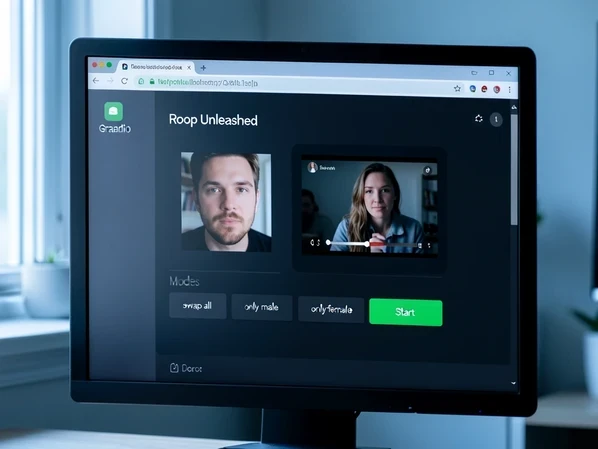
No NVIDIA card sitting in your machine? Borrow one. Roop one-click Colab notebooks and Hugging Face Spaces exist as a cloud fallback, and they spare you the local CUDA setup entirely.
The trade-offs are real. You skip the install, but you accept session limits, slower cold starts, and the fact that your source face gets uploaded to someone else's machine. Choose the cloud when you only swap occasionally, when your laptop has no NVIDIA GPU, or when fighting CUDA locally costs more time than the swap is worth. If you swap often and own a capable NVIDIA card, the local build wins on speed and privacy.
Make your first deepfake in the Gradio GUI
This is the payoff. With the GUI open on port 7860, you produce one swapped file in a handful of clicks, the flow documented for the tool itself.
- Open the browser GUI on port 7860.
- Upload your sources: the face you want to apply and the target image or video.
- Pick a mode. Swap all faces, only male, only female, or select specific faces when the frame holds several people.
- Click Refresh to preview the swap in real time, then click Start to process the full file.
- Optionally tick face restoration (GFPGAN) and upscaling before processing for a cleaner result.
- Download the finished file. Outputs land in your output folder, saved as webp or jpeg.
Targeting one person in a group? Skip swap-all and use specific selected-face mode. You click the face you want replaced, leave the rest untouched, and Roop applies the source only there. That single setting is the difference between a clean edit and a chaotic one where every face in the shot changes.
Improve swap quality: enhancers, upscalers and masking
The default swap often looks soft, and that is fixable without leaving the UI. Turn on Restore Face and the Upscaler first. GFPGAN restoration rescues low-quality source faces, the RestoreFormer enhancer offers an alternative, and auto-rotation straightens faces that sit sideways in the frame so detection does not stumble.
Still soft? Switch to the ReSwapper model, which the Codeberg project added as an alternative with 128px and 256px output, a real bump over the default when sharpness matters. On the Stable Diffusion extension route, the lever is img2img denoise: start at 0.1 and raise it gradually, checking after each small step so you sharpen detail without losing the likeness. For tricky frames where hair or a hand crosses the face, smart face occluder masking driven by text prompts keeps the swap from bleeding past where it belongs.
Fix the errors you will actually hit
Maintainers tend to answer install problems with 'google it', so here are the failures by name and the one-line cause behind each.
- Face does not swap at all: roop detected the image as NSFW or found no face, so it silently skipped the swap. Confirm Enable is ticked, use a clear frontal non-NSFW face, and read the console.
- 'NoneType' object has no attribute 'get': the face-swap model is missing. Download
inswapper_128.onnxand place it in<webui_dir>/models/roop/. - Startup failure with CUDA but no NVIDIA GPU: the CUDA path expects a card that is not there. Update to the bugfixed version or disable the CUDA option.
- WinError 2 or 'ffmpeg' not found on a video swap: image swaps work, video needs ffmpeg. Install it and make sure it is on your PATH.
- Mac ONNX limitations breaking inference: run inside a Linux VM or container instead of natively.
The NoneType case is worth a worked example because it confuses beginners the most. The error is not a crash in your photo. It means the swapper never loaded its weights. You fetch inswapper_128.onnx, you create the models/roop/ folder inside your web-ui directory if it does not exist, you drop the file in, you restart. The swap then runs against the same image that failed a minute ago.
Use it responsibly and legally
The project ships its own line on this, and it is short: if you use a real person's face, get that person's consent and clearly state the content is a deepfake when you post it online. Respect privacy. Abide by your local law, because the repository disclaims liability for misuse and the responsibility lands on you.
There is a licensing limit too. Roop Unleashed is distributed under AGPL-3.0, and the project states it is for technical and academic use only. That framing should shape how far you take any commercial plans before checking the license terms against what you intend to do.